Setup the World News API MCP Server
First install the MCP server, the instructions are easy to follow on the World News API MCP Github page.
Now get your API key ready and open your favorite MCP client. In this tutorial we'll use Claude Desktop. Open the App config:
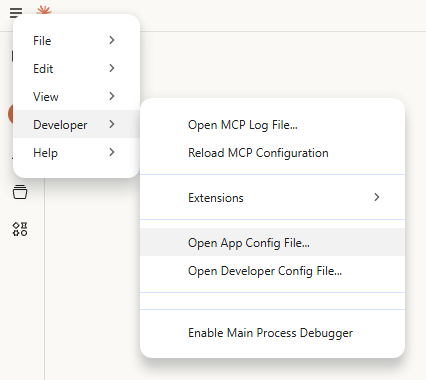
Now paste in the following snippet and replace your_api_key_here with your API key.
{
  "mcpServers": {
    "world-news-api": {
      "command": "world-news-api-mcp",
      "env": {
        "WORLD_NEWS_API_KEY": "your_api_key_here"
      }
    }
  }
}
And that's it! You can now ask about news and if your AI client decides that World News API has a proper answer it will contact the API on your behalf. See the video below for an example conversation.
World News API MCP in action with Claude Desktop
Frequently Asked Questions
What is MCP and how does it work with World News API?
MCP (Model Context Protocol) is a standard that allows AI assistants like Claude and ChatGPT to access external tools and data sources. The World News API MCP server lets AI tools search news, retrieve articles, and analyze current events directly through natural language.
Which AI tools support the News API MCP server?
The World News API MCP server works with Claude Desktop, ChatGPT (via plugins), Cursor, and any other AI tool that supports the Model Context Protocol. New MCP-compatible tools are being added regularly.
How do I install the News API MCP server?
Install the MCP server by adding the World News API server configuration to your AI tool's MCP settings. You need your API key and the server package name. Detailed setup instructions are provided in the documentation for each supported AI tool.